Fanvue Signup Guide 2026: become a creator step by step
This is not a generic “click here and good luck” article. We opened a Fanvue creator account ourselves, followed the registration screens, verified the email, completed identity verification and reached the creator dashboard. Below you can follow the same route in plain English.
Disclosure: EarnPorn may earn a referral commission if you join Fanvue through our link, at no extra cost to you. We still keep the guide practical, honest and based on the signup flow we tested ourselves. How we tested this guide.
What you need before creating a Fanvue creator account
You do not need a perfect studio or a huge audience to create the account. But you should prepare the basics before you start, because the platform will ask for details that matter: your email, your public name, your username, your country, your content type, your subscription price and your identity verification.
The big thing to understand is this: the name you choose as your display name is the name fans will see. If privacy matters to you, do not use your real name as your public creator name. Choose a stage name and a username that you are happy to use as your brand.
How to become a Fanvue creator, step by step
Follow the screenshots in order. We have written this like we would explain it to a normal person sitting next to us: no technical nonsense, just what you need to click, what you should be careful with, and what happens next.
Ready to follow the guide? Open Fanvue in a new tab, then come back here and move screen by screen. The button below uses our official Fanvue referral link.
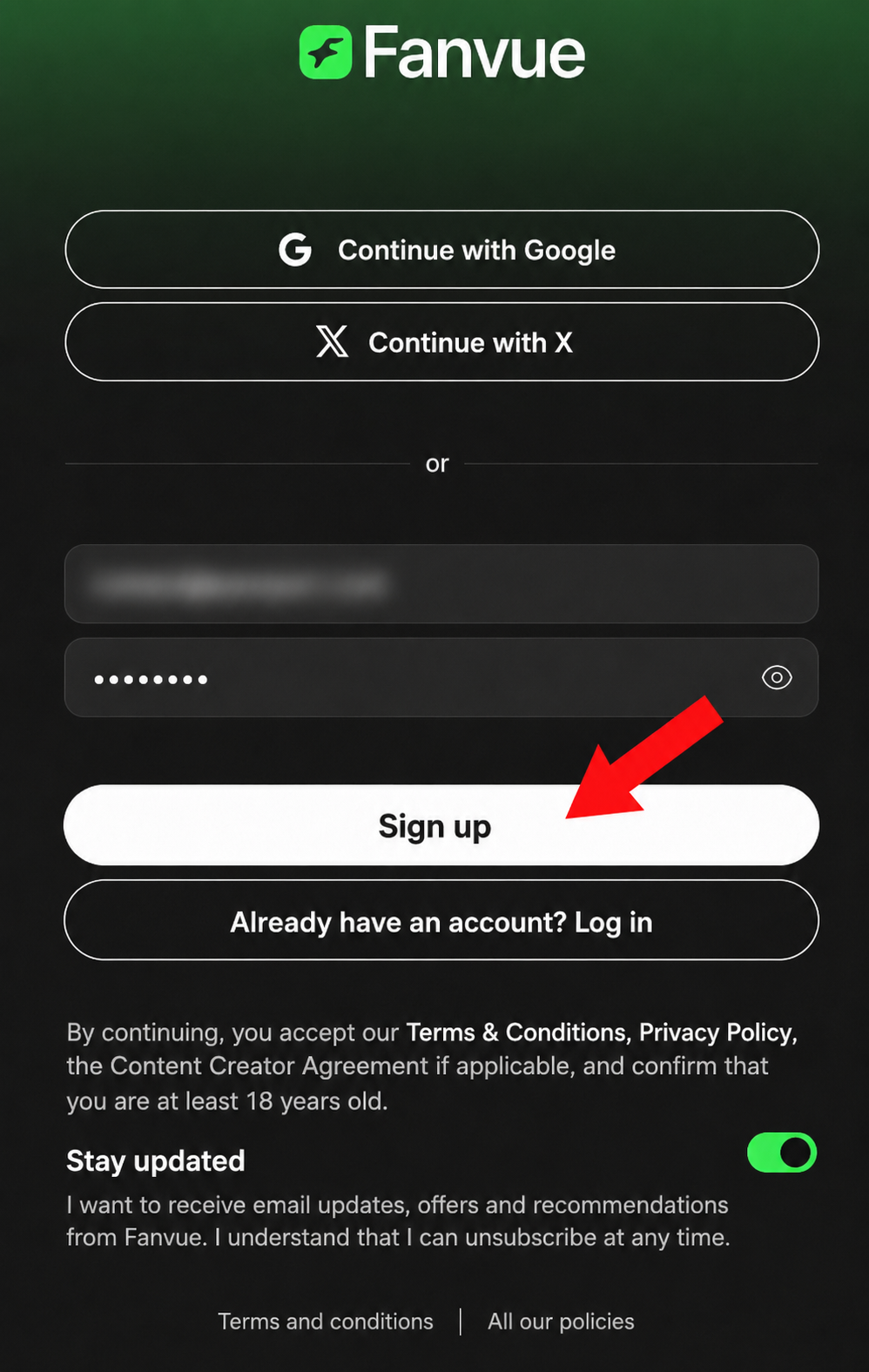
Start on Fanvue →Enter your email and password, then click “Sign up”
You can create the account with email and password, or you can use one of the social login options shown on the screen. For creator business, we prefer using a separate email that is not connected to your private life. Fill the fields and click Sign up.
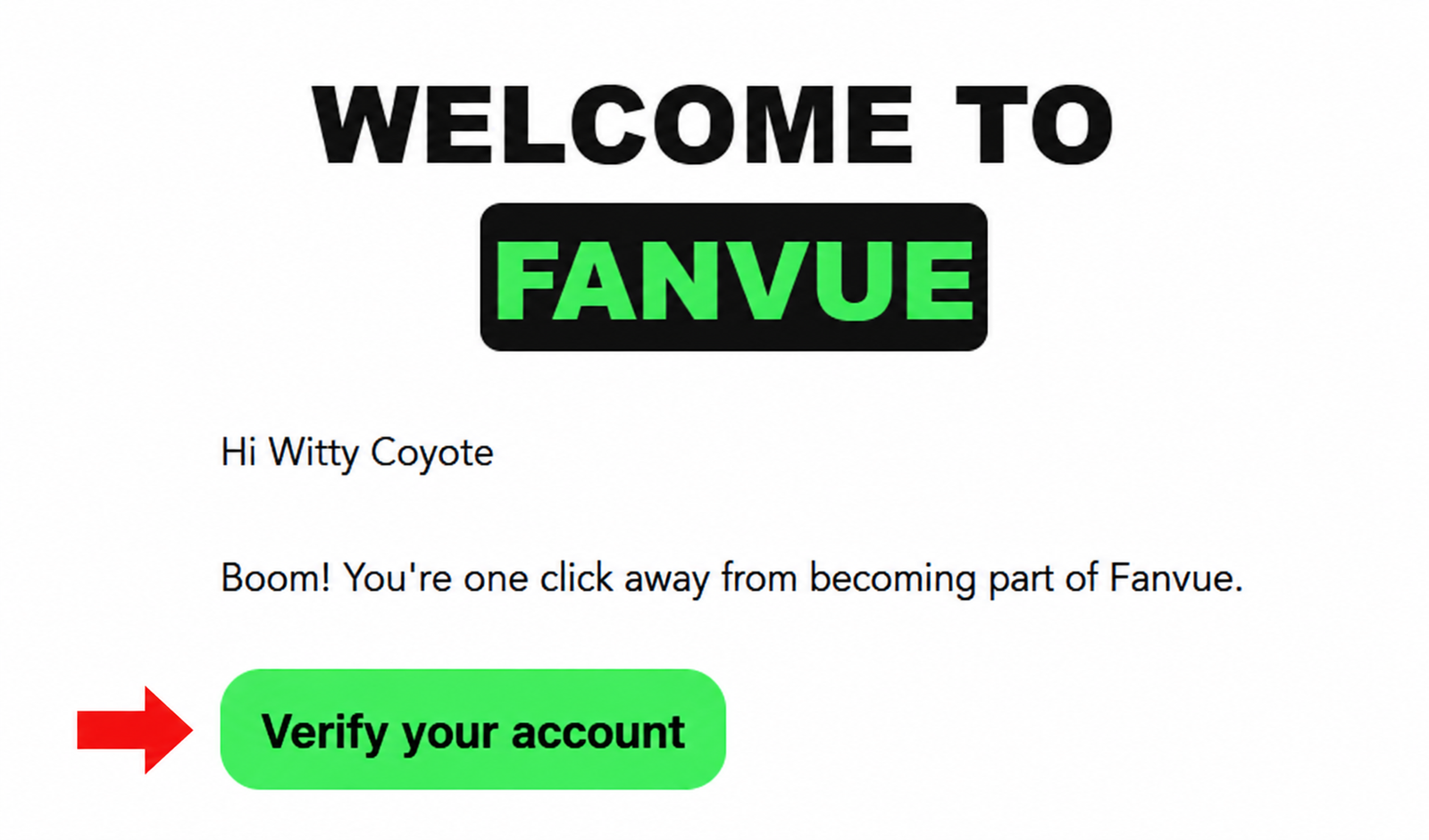
Verify your email address
After signup, Fanvue sends a confirmation email. Open your inbox, find the Fanvue email and click Verify your account. Without this step, you may not be able to continue the creator setup properly.
Complete the creator setup screens
This screen is really six small steps in one. Fanvue asks for your country, creator type, content type, public name, username, subscription price and then sends you toward identity verification.
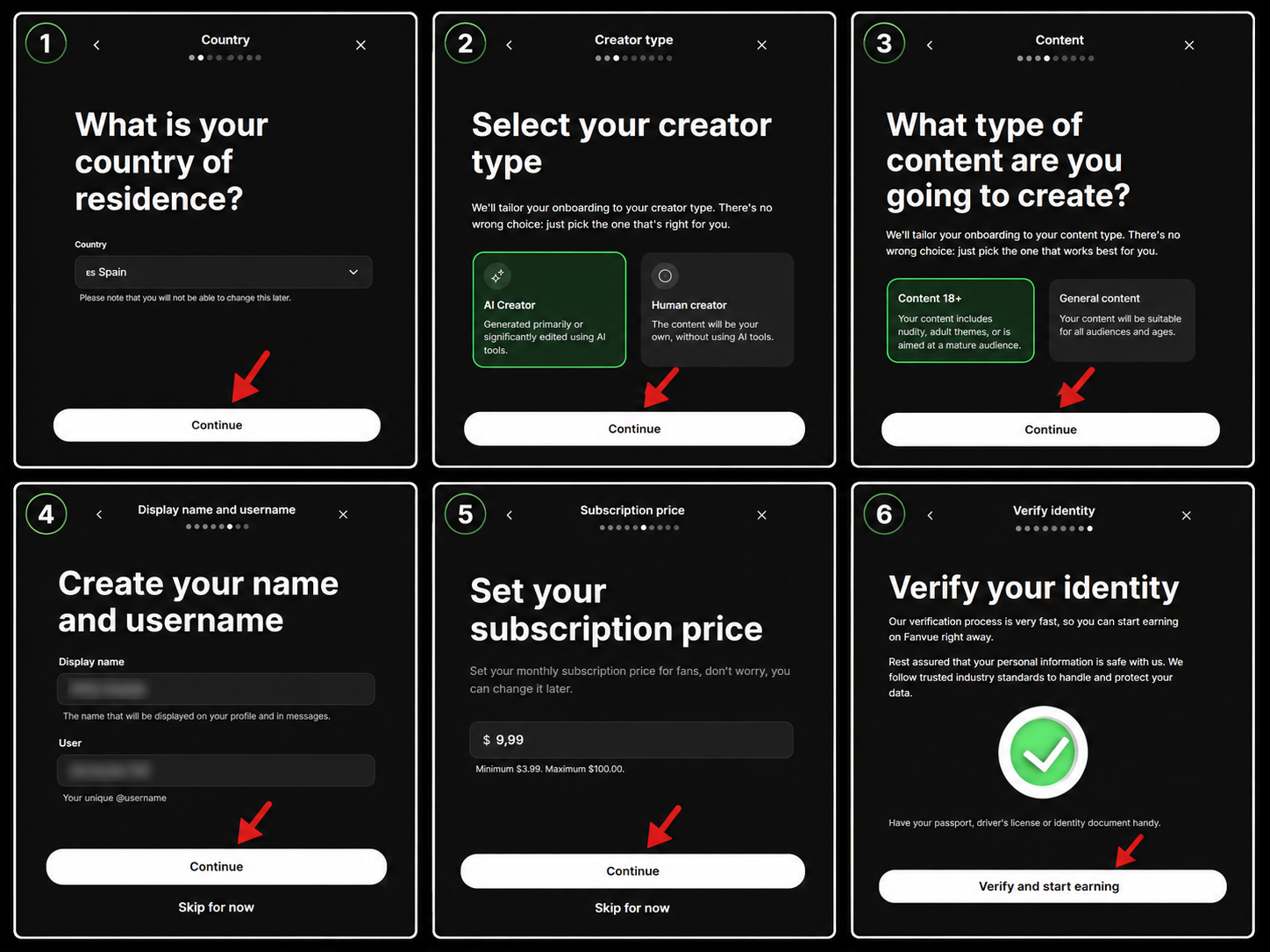
Here is what each part means in normal language:
Move identity verification to your phone
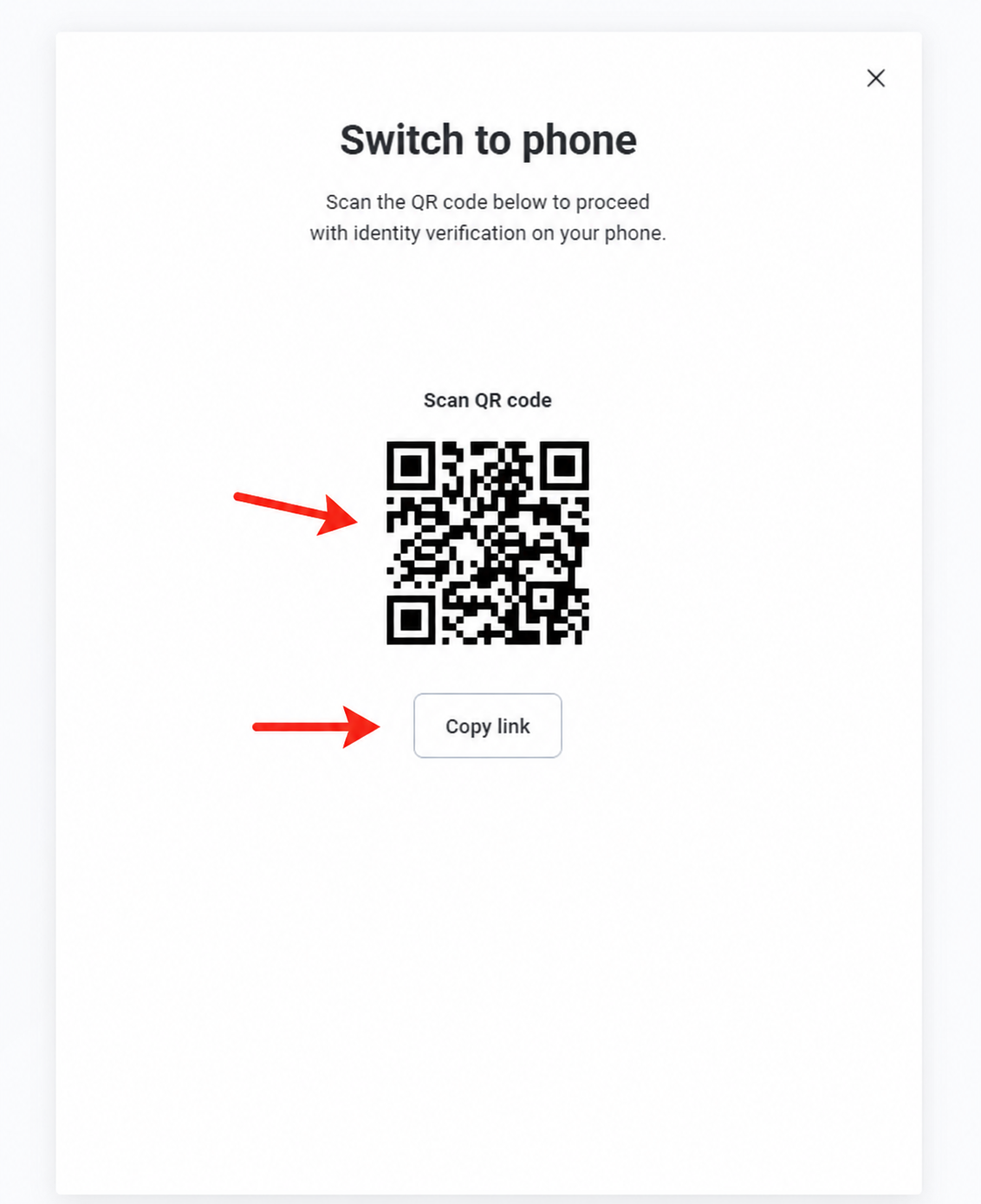
Fanvue may move identity verification to your mobile phone. On desktop, you will see a QR code and a copy-link button. You can scan the QR code with your phone camera or with an app like Google Lens, tap the link that appears, and continue the identity check on your phone.
Accept terms, scan your document and take the selfie
This part is the real identity verification flow on your phone. It looks long, but it is simple if your photos are clear. Accept the terms, select your document type, capture the front and back of your document, take a selfie and wait for the check to complete.
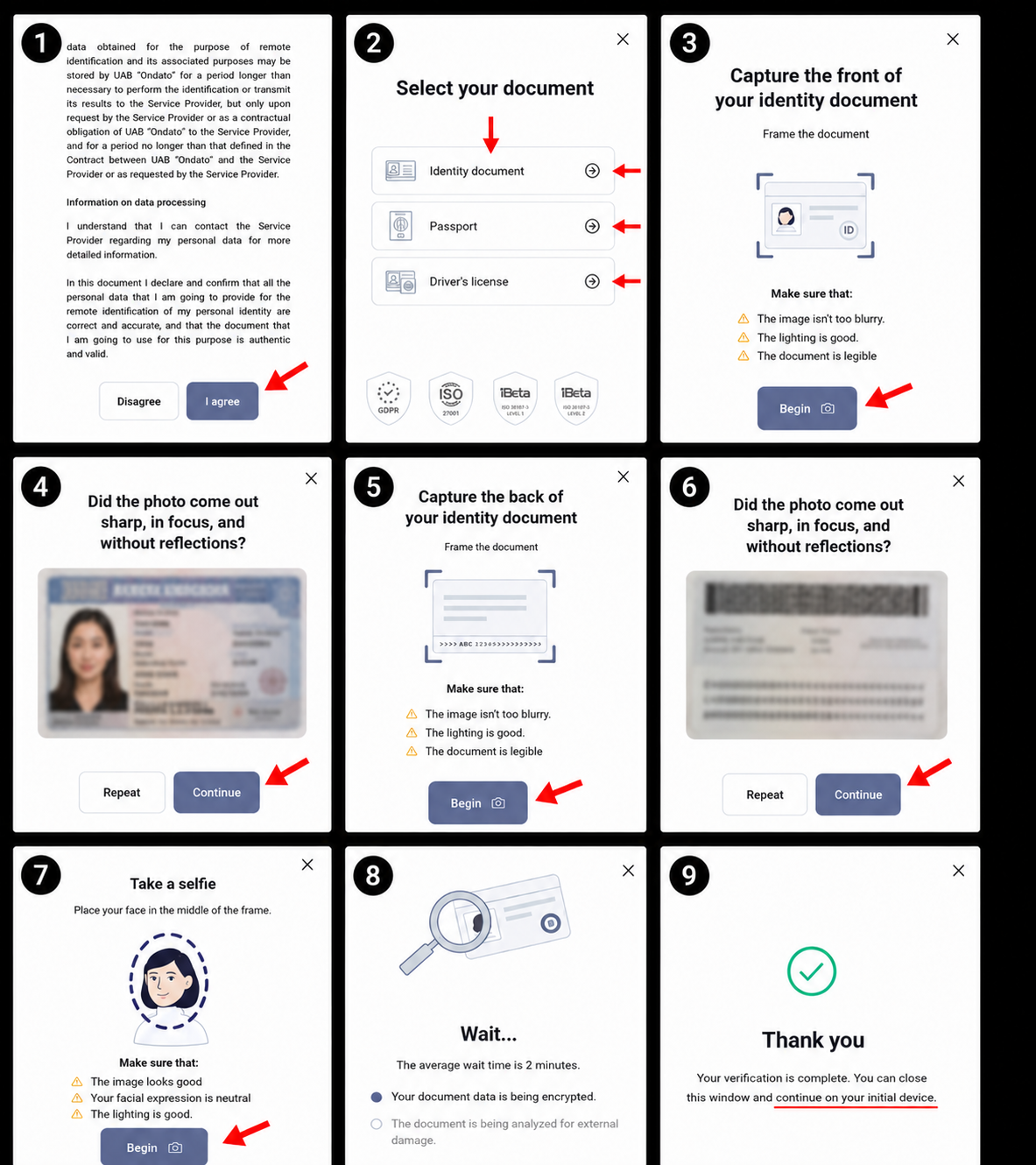
You usually get options like identity document, passport or driver’s license. In our test flow, we used an identity document. If the system says the image is too blurry, too dark or has reflections, repeat the photo until it accepts it.
Tell Fanvue where you heard about it
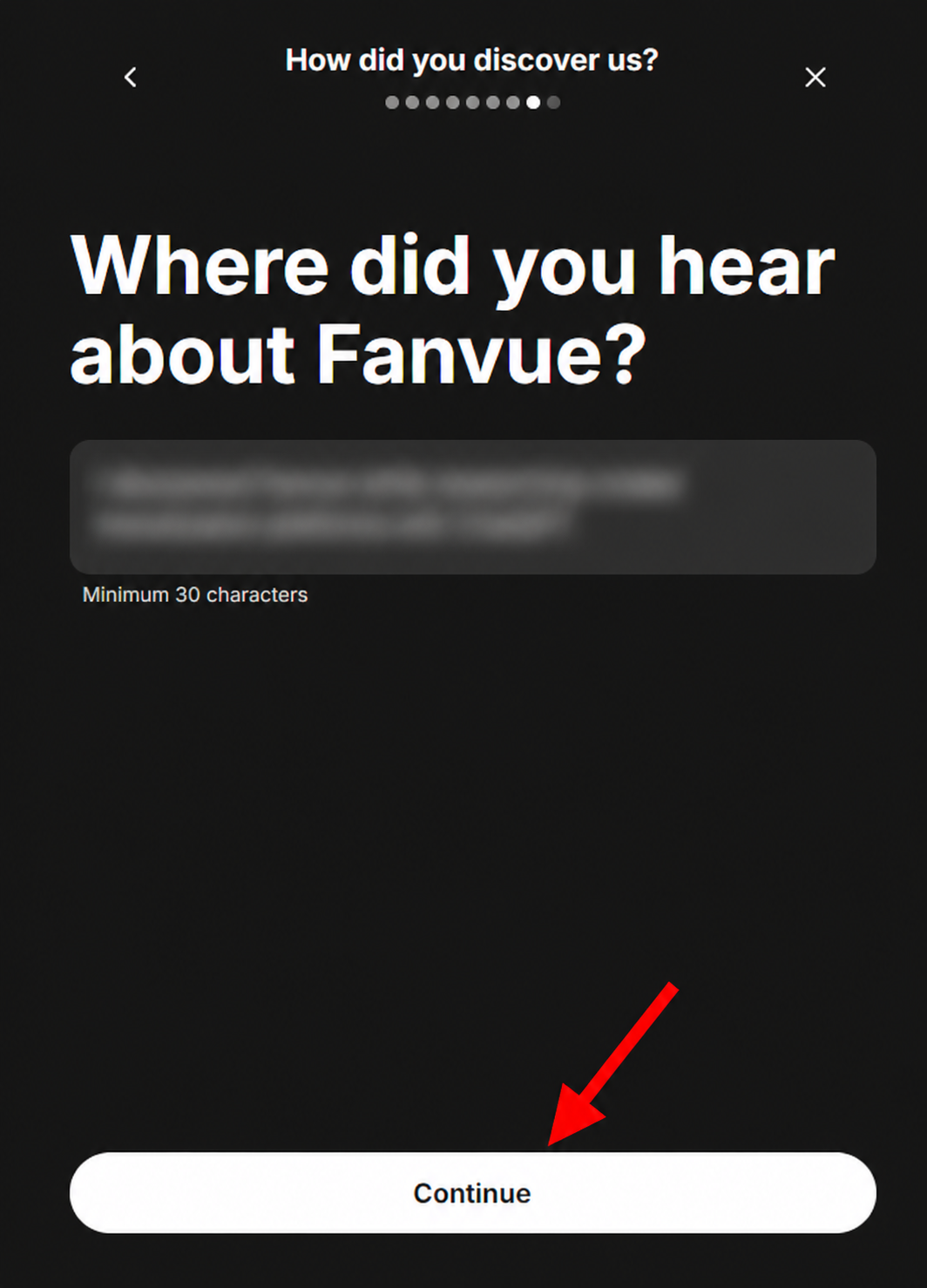
Fanvue may ask where you discovered the platform. If this guide helped you, we would appreciate it if you write earnporn.com. Keep the answer short and natural, then click Continue.
Finish the onboarding
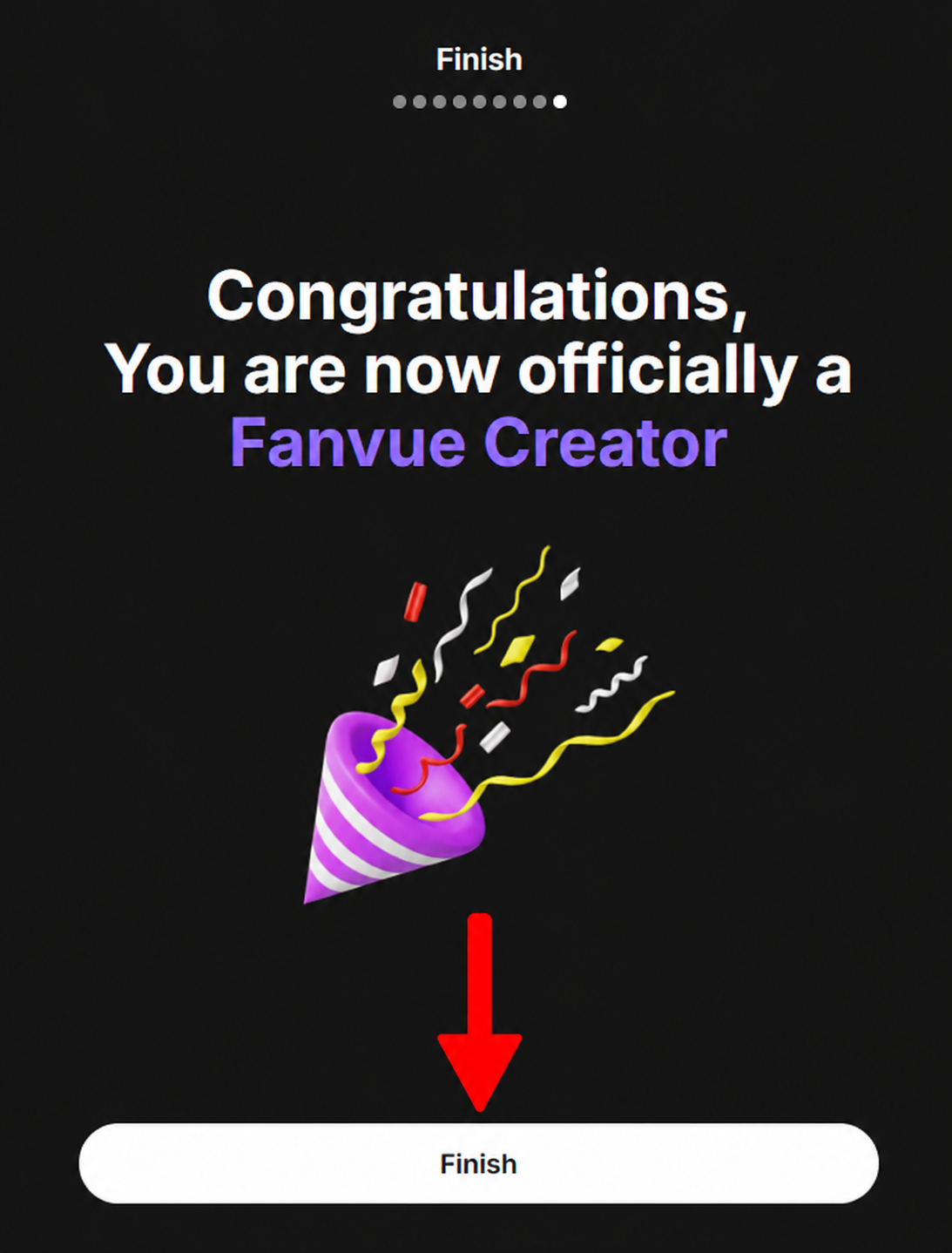
When Fanvue confirms that your creator account is ready, you will see the congratulations screen. Click Finish and move into your creator dashboard.
You are inside the Fanvue creator dashboard
This is where the real work starts. The dashboard shows your earnings, subscribers, followers, profile completion, creator tools and business activity. At this point, do not just close the page. Finish your profile, set payouts, upload content and prepare your first offer before sending traffic.
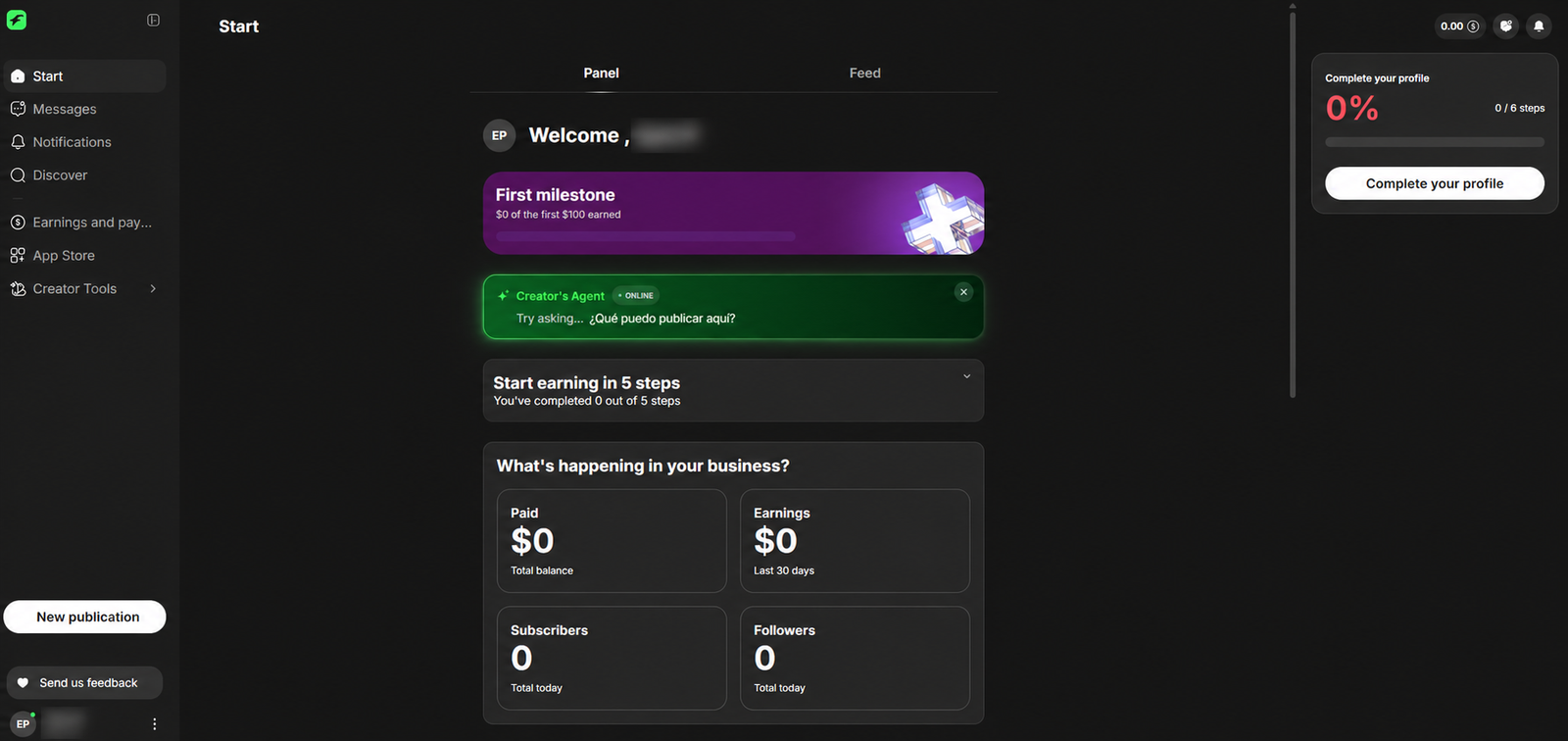
That is the full registration flow. The account is created, the email is verified, the ID check is complete, and you are inside the creator dashboard. Now the next goal is not “having an account” — it is making the page look worth subscribing to.
Create Your Fanvue AccountWhat to configure inside Fanvue before promoting your page
Opening the account is only the first part. The creators who have a better chance of converting visitors into paying subscribers usually complete the profile before sending traffic.
Finish your public profile
Add a profile picture, banner, bio and clear description of what subscribers get. Your profile is your sales page.
Upload your first batch
Fanvue recommends populating your page before promotion. A profile with no content is harder to sell.
Review your subscription price
The onboarding screen may show a default price, but you should choose a price that matches your niche, content volume and upsell plan.
Set your payout method
Go to earnings and payout settings, add the required details and confirm what payout options are available in your country.
Set welcome messages
A simple welcome message can start conversations with new subscribers and help sell extra content or paid messages.
Promote daily
Do not wait for magic. Send traffic from Reddit, X, your existing audience, other adult platforms or cam platforms where allowed.
How creators can earn on Fanvue
Fanvue is not only about a monthly subscription. The stronger setup is usually a mix: subscription income, paid messages, tips, standalone content and smart promotion.
The normal earning stack
Fanvue’s own help centre describes subscriptions as a main income source, but also mentions extra earning options such as tips, standalone content, pay-to-view messages and other paid interactions. The real job is to build a profile that gives fans a reason to subscribe and then gives them reasons to spend again.
- Subscriptions: monthly access to your profile content.
- Pay-to-view messages: locked content sent through messaging.
- Tips: direct support from fans who want to reward you.
- Standalone content: paid posts or individual items where available.
- Referral earnings: Fanvue also has a creator referral scheme for verified creators.
Standard creator rate
Fanvue says it is transitioning to its standard 80% creator earning rate. Always confirm the current rate inside your account.
Subscription price range
Fanvue’s creator guidance mentions subscription prices in this range, with $5–$30 often positioned as a practical sweet spot.
Creator referral earnings
Fanvue’s referral policy says verified creators can earn 5% of referred creator earnings for 12 months, subject to terms and limits.
Promotion matters
Fanvue’s own growth advice stresses consistent promotion. A good profile still needs traffic.
| Area | What Fanvue says | What this means for beginners |
|---|---|---|
| Creator earning rate | Fanvue has described the platform as transitioning to its standard 80% creator earning rate. | Do not calculate your plan from gross sales only. Think about what you keep after platform fees, taxes, refunds or chargebacks. |
| First payout | Fanvue says creators should have an available balance that meets the threshold, and first-time payouts may go through routine checks. | Do not expect instant money the same day you create the account. Configure payout settings early and read the requirements. |
| Minimum threshold | Fanvue mentions a $20 minimum threshold, but also says regional minimums may vary, often $20–$50. | Your country can affect the threshold. Check the payout screen inside your own account. |
| Content requirement | Fanvue says creators need at least 5 pieces of content uploaded to request payout. | Before promotion, upload a small starter batch instead of leaving the account empty. |
| Payout methods | Fanvue lists bank transfer as a universal payout method and also mentions MassPay, Cosmo and crypto depending on location. | Prepare your payout details and do not assume PayPal will be available. |
| Referral earnings | Fanvue’s referral policy says verified creators can earn 5% from referred creator earnings for 12 months, with conditions and limits. | After approval, check your Refer & Earn area. In our test, it appeared after identity verification and approval. |
Fanvue vs other creator platforms on EarnPorn
For this website, Fanvue is now one of the platforms we can recommend strongly because we have a working creator referral link and we have tested the signup flow ourselves.
Fanvue
Good option for creators who want subscriptions, paid messages, AI-friendly positioning and a modern creator dashboard. We have a real Fanvue referral link.
Start on FanvueFansly
Another strong OnlyFans-style platform, especially for creators who want internal discovery tools and adult creator monetization.
Start on FanslyOnlyFans
The most recognized subscription platform, and EarnPorn now has a confirmed OnlyFans referral link.
Start on OnlyFans ↗Why this Fanvue guide is based on real experience
This page was built from a real creator registration flow, not copied from a generic list of platforms. That matters because signup screens change, verification steps are confusing, and beginners need to see what actually happens.
We created the account ourselves
We went through the Fanvue creator registration flow, from account creation to the dashboard, and used our own screenshots to explain the process.
Real screenshots, private data hidden
The screenshots show the actual flow, but personal details, email, ID information and private account data were blurred or replaced for privacy.
No guaranteed income claims
Fanvue can be monetized, but no platform guarantees earnings. Income depends on content quality, traffic, pricing, retention and how consistently you promote.
Source note: we checked Fanvue’s help and policy pages for creator earnings, payout basics, payment methods and referral terms. Platform rules can change, so always confirm the current details inside your own Fanvue account before relying on any payout or commission number.
Fanvue Help CentreFanvue creator signup questions
The common doubts before opening a Fanvue creator account.
Is Fanvue free to join as a creator?
Yes, creating the account is free. You still need to complete the required creator setup and identity verification before the account is ready to use properly.
Do I have to verify my identity?
Yes. If you are creating a creator account, expect an ID and selfie verification flow. This is normal for adult creator platforms because they need to confirm age and identity.
Can I use a stage name?
Yes, and you probably should if you care about privacy. Your display name is public, so use a creator name instead of your real name if you do not want fans to see your real identity.
Can I change the subscription price later?
Fanvue lets you choose a subscription price during onboarding, and the dashboard gives you more settings afterward. Build your pricing around your content volume and upsell strategy.
How do creators make money on Fanvue?
Creators can earn from subscriptions, tips, paid content, pay-to-view messages and other monetization tools available in the dashboard. The strongest pages usually combine several income sources.
What should I do right after approval?
Complete the profile, upload your first content batch, set your payout method, write a good bio, configure welcome messages and then start promoting. A blank profile is hard to sell.
Does Fanvue have a referral program?
Yes. Fanvue has a creator referral system. In our test, after the creator account was verified, the referral area appeared and showed the option to copy a referral link.
Should I start with Fanvue or Fansly?
If you want a modern OnlyFans-style alternative, Fanvue is worth testing. If you also want internal discovery and another adult creator platform, read our Fansly signup guide and compare both.
Ready to test Fanvue as a creator? Start with the real signup flow.
Open Fanvue, create the account, verify your email, complete the identity check and finish the dashboard setup. Then come back to EarnPorn and compare Fanvue with Fansly, OnlyFans and webcam platforms before deciding where to focus your traffic.
Adults 18+ only, or the legal age in your country or jurisdiction, whichever is higher. EarnPorn may earn a referral commission from Fanvue, OnlyFans, Fansly, Chaturbate and BongaCams links. We do not guarantee earnings. Your results depend on your content, audience, promotion, pricing, retention, platform rules and compliance with applicable laws. Read our Terms of Use, Privacy Policy, 18+ Policy and DMCA Policy.